Legal
SMS Consent
Last updated August 15, 2026
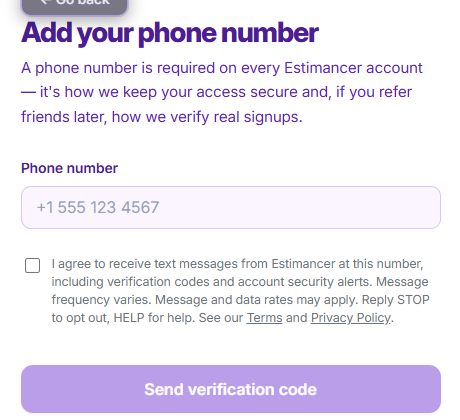
Estimancer sends text messages in two situations, and requires an explicit, affirmative opt-in checkbox before either one is possible. This page documents both consent checkpoints as they actually appear in the product.
1. A contractor's own number (account verification)
When a contractor adds or verifies their own mobile number, they must check a consent box before a code is sent. Screenshot of this step, taken directly from the live app at /signup/add-phone:
2. Texting an estimate link to a contractor's client
A contractor’s clients (homeowners requesting an estimate) are never texted without the contractor first attesting, at the moment of sending, that the client agreed to receive it. Screenshot of the "Send to Client" dialog, taken directly from the live app, with that checkbox checked and the Text Message option enabled as a result:
![Estimancer’s Send to Client dialog, showing a required checkbox reading: I confirm [client name] has agreed to receive a text message from me about this estimate. The Text Message send option is disabled until this box is checked.](/screenshots/send-to-client-consent.png)
This confirmation is the sole consent checkpoint for texting a client, required on every send, there is no separate way to pre-record a client’s consent elsewhere in the product.
Message details
- Message frequency varies by account activity, typically one code per login/verification, or one text per estimate sent.
- Message and data rates may apply.
- Reply STOP to opt out at any time, HELP for help.
- We do not share or sell mobile phone numbers with third parties for marketing purposes. See our Privacy Policy.
- Full program terms are in our Terms of Service.